موزیلا و گوگل دهها آسیبپذیری امنیتی را در مرورگرهای فایرفاکس و کروم اصلاح کردند
شرکتهای موزیلا و گوگل بهروزرسانیهای امنیتی جدیدی را برای مرورگرهای فایرفاکس و کروم منتشر کردند که در مجموع بیش از ۲۰۰ آسیبپذیری را برطرف میکنند. فایرفاکس ۱۶۷ نقص امنیتی و کروم ۵۲ آسیبپذیری را رفع کردهاند که برخی از آنها بسیار خطرناک و بحرانی بودهاند.
کاربران مرورگرهای وب باید هرچه سریعتر نرمافزارهای خود را بهروزرسانی کنند تا در برابر آسیبپذیریهای امنیتی جدید محافظت شوند. موزیلا نسخه ۱۵۹ فایرفاکس را برای سیستمعاملهای مختلف منتشر کرده که شامل بسته اصلاحی برای ۱۶۷ نقص امنیتی است. از این تعداد، ۱۰۸ مورد در سطح خطرناک ارزیابی شدهاند و مابقی دارای شدت متوسط یا پایین هستند.
بسیاری از این موارد مشکلات مدیریت حافظه از نوع استفاده پس از آزادسازی (UAF) هستند که مهاجمان میتوانند از آنها برای از کار انداختن مرورگر یا اجرای کدهای مخرب بهرهبرداری کنند. تعدادی از این باگها همچنین مربوط به بخش سندباکس فایرفاکس هستند که به هکرها اجازه میدهد از این ناحیه حفاظتی عبور کنند. علاوه بر اصلاحات امنیتی، فایرفاکس ۱۵۹ ویژگیهای جدیدی مانند بهبود اشتراکگذاری در مک، دسترسی آسانتر به گذرواژهها در نوار کناری و پنجره هوشمند مبتنی بر هوش مصنوعی برای نظارت بر تغییرات وبسایتها را به همراه دارد.
در همین حال، گوگل نیز نسخههای جدید مرورگر کروم را برای ویندوز، مک و لینوکس عرضه کرده که ۵۲ آسیبپذیری امنیتی را برطرف میکند. از میان این موارد، چهار آسیبپذیری در سطح بحرانی و ۴۶ مورد در سطح خطرناک قرار دارند. آسیبپذیریهای بحرانی کروم نیز به مشکلات فساد حافظه و دور زدن سندباکس مربوط میشوند که میتوانند به اجرای کدهای مخرب منجر شوند.
نکته قابل توجه در گزارشهای امنیتی هر دو شرکت، اتکای فزاینده به ابزارهای هوش مصنوعی برای کشف و رفع این آسیبپذیریها است. موزیلا اعلام کرده که بخشی از این باگها توسط پژوهشگران OpenAI کشف شدهاند، در حالی که گوگل نیز سهم ابزارهای هوش مصنوعی شرکت Anthropic و OpenAI را در شناسایی چندین نقص امنیتی تایید کرده است.
Firefox and Chrome patch 200+ security flaws combined – update both ASAP
The latest version of Firefox fixes 167 security vulnerabilities, most of which are of high severity, while the newest version of Chrome patches 52 flaws, four of which are critical.
ZDNET’s key takeaways
- Firefox 159 patches 167 security flaws, most of which are of high severity.
- The new version of Chrome resolves 52 flaws, four of which are critical.
- Firefox also can now monitor a website and alert you to any changes.
With security vulnerabilities continually plaguing the software we use, it’s time once again to update both Firefox and Chrome browsers to protect yourself from the latest exploits.
Firefox
This week, Mozilla updated Firefox to version 159, not just for Windows but also for Android, MacOS, and Linux. The latest version includes fixes for 167 security bugs. Among these, 108 are rated of high severity, while the rest are considered moderate or low.
More from ZDNET
Almost 100 of them are defined as use-after-free (UAF) vulnerabilities, which are memory management flaws that an attacker could exploit to crash the browser or trigger malicious code. Several of the bugs also refer to Firefox’s Sandbox, which means that hackers could break through the browser’s protected Sandbox area to execute malicious code.
Given the nastiness of the security bugs, you’ll want to update Firefox ASAP. For that, open the browser, click the three-line icon at the upper right, move to Help and Report, and select About Firefox. The latest update will then be installed. Restart Firefox to finish the process.
Also: I dumped Firefox, but these 5 features finally won me back
Beyond the security patches, Firefox 159 adds a few handy new features.
With Firefox for the Mac, sharing a page in the browser now displays the built-in MacOS share picker. Here, you can see a preview of the page you want to share along with recent contacts and specific apps such as AirDrop and Messages.
Next up, you’re now able to access Firefox’s passwords tool in the sidebar. This lets you more easily view any website passwords that you’ve saved to the browser. To see this in action, first make sure the sidebar is visible. For that, click the Sidebar button on the Address bar and then click the key icon to display your saved passwords.
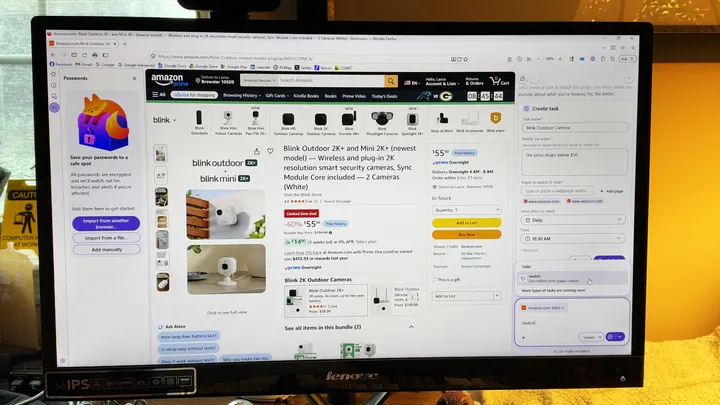
And as perhaps the most helpful new feature, Firefox’s AI-powered Smart Window can now watch specific web pages for changes and send you a notification when the page is updated. For this, turn on the option for Smart Window if it’s not already enabled. Click the Firefox icon in the upper right and select Smart Window. Navigate to the website for which you’d like to be notified of any changes. At the chat window, type /watch, fill out the form, and then click the Create Task button.
Chrome
That takes us to Chrome with version 56.0.8078.73/.74 for Windows and Mac and version 156.0.8078.73 for Linux. Here, the latest update patches 52 security bugs. Out of these, four are rated critical, while 46 are rated high.
The four severe ones point to a memory corruption problem. But like some of the Firefox bugs, they also reference the browser’s Sandbox. In this case, an attacker who exploits any of these vulnerabilities could bypass Chrome’s protected Sandbox area to run malicious code. Also as in Firefox, several of the bugs point to use-after-free (UAF) issues that would allow an attacker to exploit memory management flaws to crash the browser or install malicious code.
Also: Chrome warns you about suspicious websites now
To update Chrome, click the three-dot icon at the top, move to Help, and select About Google Chrome. If prompted, allow the latest update to download and then restart the browser to finish.
Beyond many of the bugs themselves, Firefox and Chrome also share an increasing reliance on AI to find and resolve security flaws. In its advisory, Mozilla cited Amy Burnett, a security research and analyst at OpenAI, for uncovering many of the bugs. In its blog post, Google attributed the discovery of several flaws to Anthropic’s Claude and a few to OpenAI.
(Disclosure: Ziff Davis, ZDNET’s parent company, filed an April 2025 lawsuit against OpenAI, alleging it infringed Ziff Davis copyrights in training and operating its AI systems.)
Source report: ZDNET AI.
گزارش فارسی این خبر با کمک هوش مصنوعی و فقط بر اساس اطلاعات منتشرشده در منبع تهیه شده است.