Boxshelf is a new Android front-end that turns your ROMs into a virtual collection
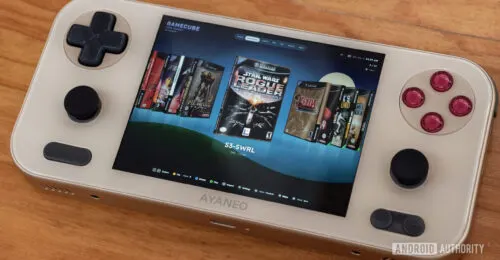
Credit: Hadlee Simons / Android Authority TL;DR A new Android front-end called Boxshelf has been released on GitHub. This launcher emphasizes box art, with games being displayed as 3D boxes that you can inspect. Boxshelf also includes a museum view to show off your games on a digital shelf. There’s no shortage of front-ends or launchers for Android handhelds . We’ve got staples like ES-DE and Beacon, while new…
Affiliate links on Android Authority may earn us a commission. Learn more.
Boxshelf is a new Android front-end that turns your ROMs into a virtual collection
Nov 6, 2026 — 5:28 AM ET
- A new Android front-end called Boxshelf has been released on GitHub.
- This launcher emphasizes box art, with games being displayed as 3D boxes that you can inspect.
- Boxshelf also includes a museum view to show off your games on a digital shelf.
There’s no shortage of front-ends or launchers for Android handhelds. We’ve got staples like ES-DE and Beacon, while new entrants like Socket and Play Field Portal have also made their mark. However, Boxshelf is the latest front-end to land on Android, and it might be up your alley if you miss physical games.
Boxshelf launched on GitHub yesterday as a gaming-focused front-end for Windows and Steam Deck, but the most recent update has brought an Android version. This version is designed for the dual-screen AYN Thor handheld (showing the game you’re on and its buttons), but it also works on other Android devices.
Nevertheless, Boxshelf stands out from several other front-ends thanks to its emphasis on box art. The front-end downloads box art for each game in your library and turns them into a 3D game box. The app also downloads a game’s back cover and lets you click in the right stick to inspect the game box. You can even open the virtual box to view the game manual, although manual downloads aren’t functional right now. Thankfully, each console’s game box seems to have the appropriate dimensions. So PS1 games seem to have the almost-square virtual box, for example.
You can also enter a museum view to show all games at once on a virtual shelf. Otherwise, you can still access your conventional apps (e.g., Chrome, Play Store, native Android ports) via the dedicated apps page. These apps understandably don’t get the personalized box art treatment.
This new front-end isn’t without niggles, though. The biggest issue right now is that text is tiny on my AYANEO Pocket S Mini, even if you switch to the “extra-large” interface size. This means you might have to squint to see your console selection at the top or button input guidance at the bottom. I also thought it was occasionally juddery, but it was otherwise smooth for the most part.
This isn’t the first Android front-end to emphasize your game’s art, either. Socket was released recently and it also displays your game collection as 3D cartridges, complete with the original cartridge/disc art. But Boxshelf’s focus on game boxes also makes it worth a look if you want to scratch your collection itch.