Montech King 95 3D Pro case review: The King has returned – bigger, and now with three-pane panoramic views
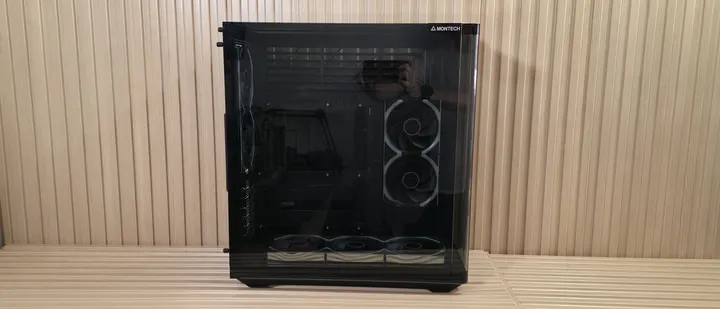
PC case, cooling, and PSU maker Montech is celebrating its 10th anniversary this year and has released a new flagship ATX chassis, the King 95 3D and 3D Pro. Like the previous King 95, the 3D version keeps the signature 15-degree curved-glass panoramic front panel and adds a top glass panel, giving you a third window and a unique aesthetic for viewing your build. An integrated, contoured ARGB strip follows the…
PC case, cooling, and PSU maker Montech is celebrating its 10th anniversary this year and has released a new flagship ATX chassis, the King 95 3D and 3D Pro. Like the previous King 95, the 3D version keeps the signature 15-degree curved-glass panoramic front panel and adds a top glass panel, giving you a third window and a unique aesthetic for viewing your build. An integrated, contoured ARGB strip follows the chassis's smooth lines, making it look every bit the king of the castle. Inside, the large mid-tower chassis supports multiple radiators (though only one 360mm), large graphics cards (plus integrated adjustable GPU support), CPU air coolers, and spots for 2.5- and 3.5-inch drives. However, it doesn't support E-ATX motherboards. The King 95 3D supports rear-connect motherboards and has ample room for cable routing and management. The front aluminum panel IO runs vertically, as with previous King cases, and includes a fast USB 3.2 Gen2x2 (20 Gbps) Type-C port. Overall, it has everything you want in a premium chassis. The uncommon three-panel view into your PC is a great way to show off your rig. The King 95 3D is available for an inexpensive (at least for curved glass) $119.90 if you want to select your own fans. The 3D Pro includes seven pre-installed LINK Fan INF 120 fans for builders who want a more coordinated look out of the box, plus it includes the Lumi hub (a dedicated fan controller), for $199.90. We have the 3D Pro version in our lab and ran the case through thermal and noise testing in its out-of-the-box configuration to show how it performs compared to others. Will it make our best PC cases list? It has a chance. But before we get into the details, here are the case's specifications from Montech. Montech King 95 3D Product Specifications Type Mid-Tower Dimensions (H x L x W) 21 x 21 x 18.8 x 11.8-inches (534 x 480 x 300mm) Motherboard Support Mini-ITX, Micro ATX, ATX Back-connect Motherboard Support Yes Color Black or White Storage Support (1) 3.5-inch (2) 2.5-inch PCIe Expansion Slots 7 Fan Support Top - 3x120 Front - N/A Bottom - 3x120mm Side: - 2x120mm Rear - 2x120mm Pre-installed fans (5) Link Fan INF 120 (Reverse blades, side/bottom) (2) Link Fan INF 120 (rear) Radiator Support Front - N/A Top - 120/240/360mm Side - 120/240mm Rear - 120mm CPU Cooler Clearance 172mm GPU Clearance 450mm (max, depends on config) Vertical GPU Support No PSU Length 220mm Dust Filters Side and Bottom Other features Great internal views, 7x pre-installed fans (Pro version), integrated GPU support, adjustable angle bottom fans MSRP King 95 3D - $119.90 (w/o fans) King 95 3D Pro - $199.90 (w/7 pre-installed fans) Warranty 1 Year Features of the King 95 3D ▶️ External Features From the outside, the King 95 3D Pro looks the part of its royal name. That signature curve and three panes of glass offer a panoramic view inside your case like few others, letting you show off your PC from even more angles. It also features a frosted, continuous LED strip running along the tiered top, right side, and bottom, adding some tasteful bling to the chassis. If you get the Pro version with the seven fans, it’s an RGB light show inside which could be polarizing. I do wish there were an option for preinstalled non-RGB fans, since the seven included ones and the infinity mirror styling may not be for everyone. Still, the curved front corner and clean lines really cement the King 95 3D as one of the better-looking panoramic cases on the market. Future Future Future Future Future Future Up front, the removable curved glass corner with a smoked tint sets it apart from most others. On the right, the front IO panel runs vertically, with the power button on top and the LED on/off button below. It has three USB ports: one 3.2 Gen2x2 (20 Gbps) Type-C and two USB 3.2 Gen1 (5 Gbps) Type-A ports. Finally, it has a 3.5mm audio jack. That continuous 118-LED strip is visible from the front, running along the top, down the right edge, and along the bottom edge. I’m not a fan of a lot of RGB, but this implementation is tasteful. You can control this lighting through the motherboard software or Montech's Lumi software, which lets you fully customize the fans and RGB strip. The main window panel also uses a smoke-colored tint, with Montech branding in the upper-right corner, and it's secured to the frame by two captive thumbscrews on the back. To remove it, loosen the thumbscrews, slide the panel back, pull from the top, then lift it out of the slots. Easy. I have to say, the biggest problem with all this glass is keeping it pristine and fingerprint-free. The other (metal) side panel, behind the motherboard, slots into the frame and is secured the same way. It has filtered venting along the top and side for the fans/radiator locations, plus another area for airflow near the power supply and drive mounting locations. In the middle is a gold placard with Montech King 95 3D 10th anniversary badging. Note: The dust filters on this panel aren't removable, so you’ll need to remove the whole panel to clean things up. Future Future Future At the top, we get a better look at the third windowed panel, letting observers peer into the case from a different angle rather than straight on or from the front. We can also see the tiered top and part of the long RGB strip. Taking this panel off isn’t as simple as the rest. Yes, it’s also secured by two captive thumbscrews on the back, but to remove it, you’ll need to open the main window panel to expose a retaining screw, remove it, then loosen the back thumbscrews and slide it to the rear. After you remove the top glass, you can remove the upper and side retaining screws to take it out. When building, I didn’t find this necessary, but it’s good to know you can take it apart if needed. Looking at the case from behind, one of the first things I noticed was the vertical PSU mounting location on the left. This space supports up to 220mm power supplies, which is all but the largest on the market. On the right, we see space for two 120mm fans, the motherboard I/O, and seven horizontal expansion slots. Unfortunately, Montech says the King 95 3D does not support vertical GPUs. Underneath the case, there isn’t a lot going on. We get a better look at the four short rubber-bottom ‘feet’ and the removable dust filter. Montech put on its thinking cap and designed the dust filter to slide out from the front, so chances are you won’t have to move your heavy case to clean it. ▶️ Internal Features Inside, the case uses a dual-chamber design, with the power supply and all wires hidden behind the motherboard tray. At the bottom, we see three Link Fan INF 120s (reverse blade) along with the mirror finish. The magnetically linked, daisy-chainable fans run up to 2,300 RPM (2,200 RPM on the reverse blade), pushing between 65-67 CFM with a maximum rating of 32dBA (29 dBA on the standard blade). A single Link Fan INF 120 costs $19.90, while a 3-pack (with Lumi Hub) is $64.90 . If you do the math for seven fans and the Lumi Hub, it’s cheaper to buy them with the case rather than separately. When powered on, the mirrored sides become an infinity panel, and with all seven matching, it creates a consistent view across the build. The bottom fan bracket is adjustable, with three positions (8 degrees). We left it down during testing, but with it up, you can focus more air towards the GPU and show off whatever fans you put in the space. The motherboard tray has plenty of cutouts to access the back of the motherboard for easy installation/removal of air coolers or AIO/custom water-cooling blocks. The case also supports rear-connect ecosystems, including Asus BTF, Gigabyte Stealth , and MSI Project Zero boards. Grommets surround the motherboard tray and are in ideal locations, but like most, they pull out easily when you try to route cables, especially those with larger connectors. I wish all case vendors would secure these better, since they're a pain to reinstall, especially when the case is full of cables. Up top, we can see the huge gap above the motherboard tray for more fans and radiators. The case cooled just fine with the seven included fans and our air cooler, though GPU temps ran a bit warmer in our noise-normalized testing. That top gap is begging to be filled with fans, even if only for aesthetics. If you plan to use an AIO cooler, this isn’t a problem, since the radiator/fans will fill the space. Future Future Future Future Future From the front, you can see the two Link INF 120mm fans and, at the bottom, the tool-less, adjustable GPU support strut. The back has space to mount two 120mm fans or one 120mm radiator. You can also see the seven horizontal expansion slots held in by thumbnail screws. Inside, the top of the case above the motherboard space fits up to three 120mm fans or a 360mm radiator. The space is offset back from the motherboard tray, which is a boon for cable management. Normally, there’s barely any room to route the EPS cables, but here there's plenty. Just note that if your build uses air cooling, you will need to fill that area with fans to make it look good. Otherwise, it’s just a blank open space above the motherboard. Future Future Future On the rear side of the chassis, we get a good look at the space behind the motherboard tray and the fan baffles. There’s plenty of room to route cables, and Montech has multiple pre-installed Velcro straps for cable routing. Even with the power supply installed, there’s plenty of room underneath it to stash excess cables. At the bottom, we see a simple ARGB hub that consolidates the three different ARGB cables from the fans into one header to control all of them. Montech also includes a magnetic Lumi fan/RGB hub (which supports up to 13 Link Fans total) with both the Pro and non-Pro variants. Oddly, it comes loose/uninstalled on the Pro, but installed on the non-Pro. The box in the lower-right holds one 3.5-inch HDD and a single 2.5-inch drive. The second 2.5-inch drive mounts in the other location at the bottom left, next to the side fans. We do like the look of the King 95 3D Pro case in black, and I bet it looks great in white with an all-white build too. The curved glass and 3-panel panoramic interior views are great for anyone who’d like to show off their now-ridiculously expensive parts. The included Link Fan INF 120 fans work well and run relatively quietly. If there’s an aesthetic drawback, it's that I’m not a huge fan of all the RGB and infinity mirrors on the pre-installed fans. It’s a lot, and it makes me yearn for an option with preinstalled fans and no RGB. Of course, you can turn them off in the software, or buy the non-Pro and choose whichever fans fit your build. MORE: Best Motherboards MORE: How To Choose A Motherboard MORE: All Motherboard Content Test equipment, method, and results CPU Intel Core Ultra 7 270K Plus CPU Cooler Thermalright Peerless Assassin 120 SE System Fans Pre-installed (if needed, Cooler Master Masterfan M120 ) Motherboard Gigabyte Z890 Aorus Elite Wifi7 Plus Gigabyte Z890M Aorus Elite Wifi Ice GPU Asus TUF RTX 4080 PSU Montech Century II 1050W Thermal tests showing how a case performs are just one part of deciding whether you should buy it. Other considerations include aesthetics (subjective), noise and how loud it is while keeping your components cool, additional features, and, of course, price. Everyone has different priorities for their PC case, be it RGB lighting, quiet cooling, ample space for your components, or the best cooling possible, noise be damned. Our goal is to give you the information you need to make an informed buying decision. To get heat into the system, we stress the CPU with Cinebench R26 (multi-threaded test) and the video card with FurMark 2 (1080p). We run the CPU and GPU tests concurrently for 30 minutes, allowing the air-cooled system to reach saturation and stabilize. We then let the system idle for 15 minutes, adjust the fans to 100%, and test again. Noise-normalized (42dBA) Maximum thermal Performance This set of tests is designed for those who love quiet PCs, with both system fans and the CPU fan noise normalized to 42 dBA. Consider this a measure of the case’s thermal efficiency when noise levels are set to run quietly. It is audible, but just (at least for my old ears). Future Future Future Noise-normalized results were among the best for the CPU and warmer than average for the GPU. The CPU averaged 87 degrees Celsius throughout testing, which is a couple of degrees better than most. The video card averaged 81 degrees, which was surprising given the three fans blowing directly at it. These temps will drop a bit if you add more exhaust fans at the top, but these are good results, especially for the CPU, and the case with these fans will keep whatever you put inside running cool, without making much noise at these fan speeds. Maximum thermal performance - fans at full speed Our noise-normalized results are for those who prefer silence, but what if you don’t mind extra noise and just want maximum performance, or you have to run things at high settings to keep high-powered devices cool? This testing is for you. Obviously, when you add fans or an AIO up top, things will change a bit, but this gives you a great idea of ‘out-of-the-box’ performance, noise be damned. Future Future Future After raising the fan speed to 100%, the CPU only dropped two degrees Celsius, mostly because we could turn the fans up a bit higher than others in the noise-normalized testing. The video card dropped a respectable nine degrees, but was still one of the warmest but in a tightly packed datasets. Again, we expect even lower temperatures with the full complement of fans installed and have no worries it will handle flagship-class hardware. Maximum Noise Levels We measure noise levels with a sound meter one meter away from the computer case, with the pre-installed fans running at maximum RPM. If a case does not have enough included fans for airflow (intake and exhaust) as configured, we add a Cooler Master M120 ARGB, since we expect most users will add at least one more fan in situations like these. (Image credit: Future) The loudest this case gets in our configuration was 53 dBA, 11 dBA above our baseline threshold. This is the second-highest among the tested chassis. I was surprised by this result too, since the entire front and top of the case are covered, while others with an open front were a couple of dBA lower. That said, this case as tested has seven fans, and these tested cases often include four (or fewer), so it’s not bad considering it’s close to double the number of fans as others. Even at full power, they didn’t sound harsh, just like fans moving a lot of air in and out. Conclusion Montech’s new King 95 3D 10th anniversary case is a notable update from the King 95. I personally own the King 95 Ultra (Limited edition) and love what it offers. And that curved glass corner was a unique feature for cases when it launched. Fast forward to today, the 3D version for its 10th anniversary takes what worked there and builds on it. It’s larger, includes a cool 118-LED contour strip for continuous lighting, and has plenty of room for large internals. At $119.90 without fans, you supply your own, or for $199.90, you can get seven pre-installed Link Fan INF120s and a hub. Performance was good all around, with the King 95 3D Pro and its seven fans doing a good job keeping the CPU cool in our noise-normalized testing. The video card did run warmer than most, but not enough to be alarming. Cranking the fans to 100% yields slightly better CPU temps, and the GPU dropped considerably, much closer to other chassis’ results. With all the fans running at full tilt, the noise was on the louder side, but it was just air turbulence. In short, feel free to pack this chassis with any hardware that fits, as it will cool without issue. It’s just a bit loud with Link fans turned up. I would like to see E-ATX motherboard support in the larger case, but that certainly isn’t a dealbreaker for most. The Montech King 95 3D is a solid premium mid-tower chassis. The top glass is a unique addition for a PC case and lets you see inside from almost any angle. It also offers ample room for large graphics cards, CPU air coolers, and a 360mm AIO at the top. The included fans add a lot of bling, but you can buy the non-Pro version of the King 95 3D and choose your own fans for a more subtle, potentially quieter, and less RGB-infused build. If you’re in the market for a larger premium mid-tower chassis and would like to show off your build through three windowed panels, the new King 95 3D (and 3D Pro) should be on your shortlist for a sub-$120 (w/o fans) or sub-$200 (w/seven fans) chassis. MORE: Best Motherboards MORE: How To Choose A Motherboard MORE: All Motherboard Content