How to clean your PlayStation 5 without damaging it
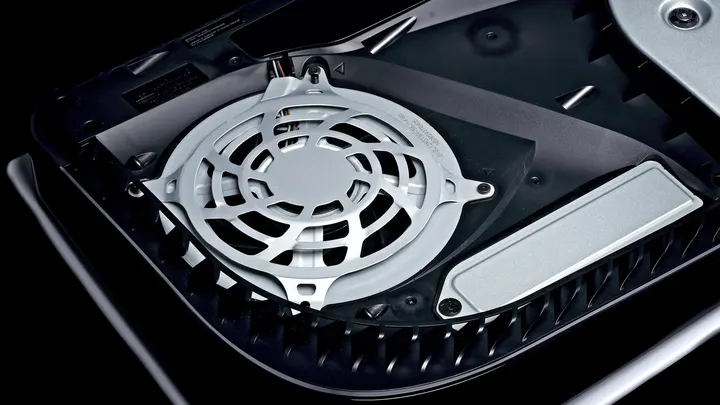
Your PS5 requires occasional maintenance to run at its best, but it only needs a light touch.
How to clean your PlayStation 5 without damaging it
There’s no need to tear down your PlayStation 5 to do a basic maintenance cleaning, but you shouldn't neglect this either.
Cleaning a PlayStation 5 isn't as exciting as playing its best games, but it's important to do on occasion. With PlayStation 5 prices climbing, you don't want to suddenly be in the market for a new console because of a total lack of maintenance. Dust buildup in the system restricts airflow and makes your system work harder to cool itself. But overzealous cleaning can be dangerous, too.
When cleaning your PS5, it's best to keep it simple and only go deeper if needed. Never start right after using the system. Prepare it for its dust exorcism by shutting it down, unplugging all cables and letting it cool before setting it on a flat, clean surface. To start, wipe off the outside surfaces to remove any dust or grit visible from the exterior. Don't use bleach or chemically treated cloths, and you shouldn't be excessively forceful while cleaning. Just give it a modest wipe-down with a clean, soft cloth, as Sony advises in its safety guide [PDF].
While you may see people recommending rubbing alcohol and other cleaners, be aware that a PS5's internal and external components include ABS, polycarbonate (PC) and a blend called PC-ABS. Each has its own chemical vulnerabilities. Sony specifically recommends against using alcohol, as it may discolor the system or degrade its materials.
A lot of this stage is focused on the outside vents. You can vacuum them if needed, but stick with a small handheld vacuum or a compressed air and vacuum combo. Don't use something heavy-duty like an industrial shop vac. Take your time and use a cotton swab to catch any dust the vacuum won't grab. A soft brush (an old toothbrush works) is helpful for scraping off caked-on dirt.
In the next step, you'll handle anything you can't reach from the outside.
Remove the covers to reach trapped dust
Once you're done with the exterior cleaning, it's time to take off the covers for a more comprehensive cleaning. These are designed to be removed, but they're fairly flimsy, so take it slow. The way to do this differs depending on whether you have an original PS5 or a Slim/Pro system. See Sony's instructions for removing the covers for illustration.
With the covers removed and set to the side, use the same microfiber cloth and handheld vacuum to catch any accessible trapped dust. You don't have to disconnect the fan or remove any internal screws; just get what you can access on both sides. If you use canned air, be careful not to spin the fan, which can generate an electric charge that damages the system. Use a cotton swab to jam the fan blades before blowing towards it. Look for the triangular "dust catcher" spots, which Sony specifically designed to gather debris for removal.
If you want to go deeper, you're able to, but you run the risk of damaging internal components and Sony's warranty excludes damage caused by unauthorized opening or work inside the PS5. Beyond pulling the covers and cleaning what's accessible there, proceed at your own risk. You'll need a TR8 Torx Security screwdriver to remove the fan screws.
When you're done, reverse the earlier process to reinstall the covers, then reattach the stand before you reconnect the console and set everything back up again. Failing to reconnect the covers properly could result in problems with airflow, potentially shortening the life of your PlayStation 5, so make sure they are aligned and connected correctly.
Consider the placement of your console, too
Using your system in either vertical or horizontal placement is perfectly fine, since the console is designed for both. Just make sure you use the stand, no matter which orientation you decide on. You can technically position the console vertically without a stand, but it's much easier to tip over and being on the ground makes it more susceptible to dust.
The original PS5 comes with an adjustable base that works in both positions, but the PS5 Slim and PS5 Pro only come with horizontal stands; vertical stands are sold separately for $30. Cleaning out dust optimizes the console's ability to circulate air, but all that work isn't as effective if you place the console improperly.
Make sure there's at least four inches of space between the console and walls, preferably with nothing overhead. Don't place the console in a cramped space like the inside of an entertainment center. It's also wise to clean the area where your console spends most of its time. Wipe down the dust and vacuum the space well so you don't have to open your system for cleaning as often.