Dell XPS Googlebook review: Beautiful hardware for a useless platform
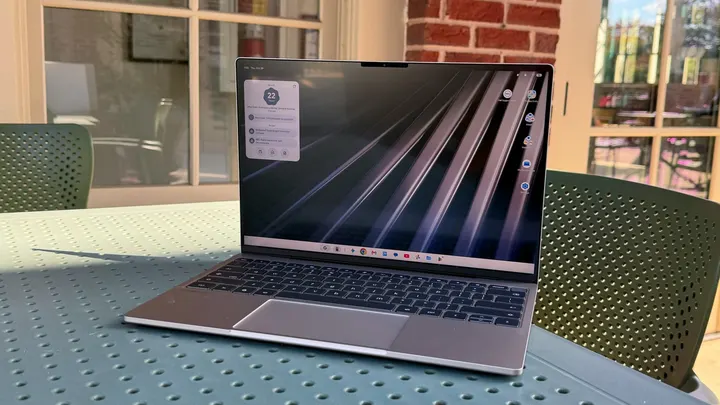
Googlebook OS still needs a ton of work.
Dell XPS Googlebook review: Beautiful hardware for a useless platform
Googlebook OS still needs a ton of work.
I can think of a few reasons to buy a Googlebook, but they're all pretty dystopian. Maybe every other computing platform has succumbed to a super AI-powered virus, leaving a Googlebook as your only option. Or perhaps Google has taken over the world and has started hunting down people who use Windows, Linux or macOS. In a world where a Googlebook is your only option, then the $1,000 Dell XPS Googlebook is probably the one to get. But in the real world, where you can get the exact same XPS hardware running on more flexible platforms with better developer support, the XPS Googlebook seems practically pointless.
But let's back up a bit and talk about Googlebook OS, Google's new laptop platform that's a combination of both Android and ChromeOS. It supports Android apps natively, it can synchronize and mirror apps from your Android phone, and it has Google's Gemini AI integrated throughout its interface. Technically, Googlebook OS should be an upgrade from ChromeOS, a platform built entirely around Google's web browser. But, after testing this laptop for the last week, I'd go so far as to say the entire Googlebook concept is a failure.
Who really wants a laptop running unoptimized Android apps? Why buy into an untested Google platform just to synchronize your Android phone, especially when you can mirror and sync Android device texts on Windows and Linux? And why would you pay the same exact price as a Windows PC for a computer that does so much less? While Apple, Microsoft and PC makers are sweating to push the computing industry forward this year, most notably with the launch of NVIDIA's RTX Spark and Apple's redesigned touchscreen MacBook Pro, Google has given us a new platform that is in many ways less useful than its aging Chromebooks.
What's special about the Dell XPS Googlebook?
For its first (and I'm hoping only) Googlebook, Dell took its recent XPS 13 design and refashioned it for Google's new OS. It still has a slim 2.2-pound metal case, making it one of the lightest systems in this size range, and it sports a 13.4-inch InfinityEdge screen. It's powered by a Qualcomm Snapdragon X Elite chip with 16GB of RAM — the same hardware on the $1,000 Windows 11 XPS 13. There are only two USB-C ports on either side of the XPS 13 Googlebook, and, unfortunately, there's no headphone jack.
A multi-colored "Glowbar" occasionally lights up on the rear of the XPS 13 — something that Google highlights as one of the defining features of Googlebook OS — but it's ultimately superfluous. It can show your charging status and battery level, but it's not exactly solving any major problems for laptop users.
It's not unusual to see PC makers reusing their designs — many companies are also recycling their existing work for NVIDIA's RTX Spark chip. But at least that platform has a few halo products designed specifically for it, like the Surface Laptop Ultra. There's nothing highlighting what's truly special about Googlebook OS — arguably because there's not exactly much to show off.
In-use: A pretty frame around a pointless platform
I could tell you that the XPS Googlebook has a very nice screen, a comfortable keyboard and a very accurate touchpad. I could tell you that its slim design and light weight makes it easy to tote around without weighing down your bag. But really, you could have learned all of that from my review of the standard XPS 13 with Windows 11. Everything good about this system comes from Dell's excellent design work.
Once I started using Googlebook OS, though, it became instantly clear that Googlebook OS is simply a hot mess. It's fine for web browsing with Chrome and accessing Google apps like Gmail and Calendar, but support for Android apps via the Google Play store is mostly disappointing. Slack only works as a mobile Android app, allowing you to see a single channel or direct message, but there's no wider desktop view like you'd see on Windows or macOS. You also can't easily react to messages and images in Slack — instead, you have to perform a long click, as you would on a normal Android phone. Evernote, meanwhile, doesn't appear at all on the Googlebook Play Store. (And yes, I still use Evernote a ton. There are dozens of us!)
"Desktop optimized" Android apps function more like you'd expect on other laptop platforms. Notability, CapCut Pad and Luminar all offer more fully-featured apps for taking AI notes and editing media, but they're only useful if those apps are already part of your workflow. I can't imagine too many people will change their editing process just to find something compatible with Googlebook OS.
Using the XPS Googlebook for my typical workflow often felt like pulling teeth. While Chrome worked fine for web browsing, resizing a photo required an odyssey through several different apps until I stumbled into Pixlr, a desktop-optimized editing app that only lets you resize an image when exporting it. Adobe Lightroom only seemed to let me resize a picture by cropping it (and it also kept bugging me to subscribe to Lightroom Premium to unlock more editing features). I eventually discovered that the standalone Viewer app has an easy way to resize images, something that isn't present in the default Photos app.
With no support for Audacity, I had to use Lexis Audio Editor to make some tweaks to a podcast file, but its basic interface seemed unsuited to more complicated edits. I might as well have just used an online editor like Audiomass (which, by the way, works just fine on Chromebooks). I also had to rely on Evernote's website to write this review, which required logging in every single time I turned on the XPS Googlebook, because the Evernote Android app was unavailable. I also eventually gave up on the Slack Android app and started using its web interface, which at least let me see all of my channels and direct messages.
I'm used to computers being gateways to sophisticated software and healthy developer support. Using the XPS Googlebook felt like being trapped in a computing stripmall: It's hobbled together by a variety of small apps of varying quality. Thank goodness for web apps, at least.
It's worth noting that Chromebooks also supported Android apps, so I don't believe there was actually a huge demand for a new Android-based computing platform.
I also wasn't impressed by any of the other Googlebook features: Syncing your Android phone to a Googlebook sounds nice in theory, but in reality it leads to redundant notifications if you have the same apps installed on both systems. You can also mirror an Android app from your phone — but again, why would you do that when you can run the app directly on the Googlebook? Given that you can already mirror Android phones and synchronize texts on Windows computers, I'm not sure why anyone would jump into a whole new platform just for these features.
Google being Google, of course, the company also crammed in as many Gemini AI features as it could into this platform. You can ask questions or edit media on the Gemini app, or wiggle the mouse pointer to ask the AI about things you encounter on the web or inside of apps. Gemini did a decent job of answering questions about products that we've featured on Engadget, but unless you absolutely want to lean on Google's AI, there really is no reason to buy a whole laptop just to have Gemini baked into everything.
Google's Rambler AI dictation feature, which lets you dictate text by speaking naturally, is also built into Googlebook OS, and from my testing it seemed to work pretty well. But it doesn't show you the text as you're speaking — it just shows a moving purple waveform, and that sometimes makes it hard to gather your thoughts or see what you were previously thinking. This is a big downside compared to just typing or using old-school dictation that used to be available on Android, but at least Rambler did a good job of cutting out natural "ums" and "uhhs," and it also formatted the text pretty well.
Battery life is another sign that the Googlebook OS platform is very unrefined. In the PCMark Android app benchmark, it lasted for 15 hours and 15 minutes, which is what we'd expect for a Snapdragon laptop. But during normal usage, I found that some apps ate up a lot of battery power without much reason. CapCut Pad managed to drain my battery by 50% in just one hour, even though it was simply sitting in the background, not doing anything. I simply couldn't trust the XPS Googlebook to last for a full day of work.
Should you buy the XPS Googlebook?
While the XPS Googlebook looks like a premium laptop, the fact that it's running an undercooked OS makes it something I can't recommend. Just get the $999 XPS 13 with Windows 11 instead — at least that gets you a mature OS that runs tons of apps and games. None of this is Dell's fault, as its XPS hardware is once again among the best in the PC world. But that doesn't matter if it's paired with yet another flimsy Google platform.
Sure, Googlebook OS will get more compatible Android apps down the line, and it may eventually turn into something more useful with upcoming AI features. But you shouldn't rush out to pay $999 with the hopes that it will get better. Why pay to be a beta tester? Google also hasn't been the best steward of its troubled platforms in the past, so I wouldn't be too surprised if Googlebook OS simply fades away due to lack of interest. This is the same company that couldn't optimize Android for tablets over the last decade.
Wrap-up
The Googlebook launch may go down as one of the more baffling moments in computing history. Instead of delivering a true successor to Chromebooks – something that was similarly inexpensive, efficient and school-ready, but also ready for useful AI features – Google delivered a half-baked platform that's in many ways a step back. Not even Dell's excellent design can save the XPS Googlebook from the mess of Googlebook OS.